# chromosomix
[](https://chromosomix.app/)
[](https://doc.chromosomix.app/)
[](https://github.com/js2264/chromosomix/actions/workflows/test.yml)
[](https://chromosomix.app/coverage/)
[](https://github.com/js2264/chromosomix/actions/workflows/deploy.yml)
[](https://www.npmjs.com/package/chromosomix)
[](https://github.com/js2264/chromosomix/releases)
[](https://chromosomix.app/validation/)
[](https://github.com/js2264/chromosomix/blob/main/LICENSE)
**A unified genome browser for multi-dimensional genomic data.** Chromatin contact maps, genome tracks and 3D models, side by side, straight from your files.
chromosomix launches in about a second and reads your data where it lives, on your own disk or in the cloud. No server, no preprocessing, no installation, no account, and it works offline. Most formats open as they are: `.*cool`, `.hic`, HiC-Pro, `.pairs`, bigWig, BED, BAM, FASTA/`.2bit`, 3D structures and more.
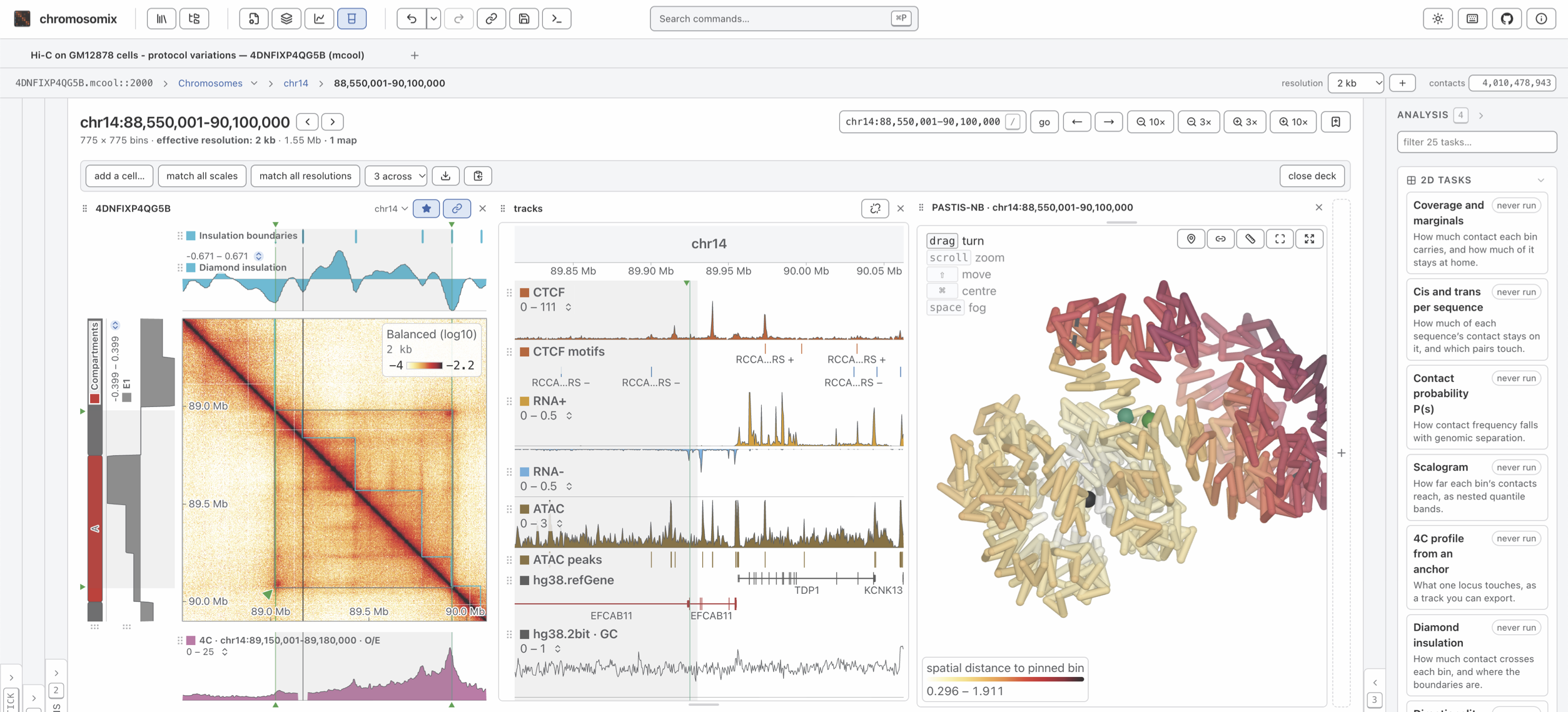
## Main features
- Support for all genomic data types:
- Supports 1D genomic formats: bigWig, bigBed, BED, bedGraph, wig, GTF/GFF3, FASTA (+`.fai`), `.2bit`, BAM, VCF, barChart/bigBarChart, genePred/refFlat/bigGenePred, bedMethyl/bigMethyl, chrom.sizes, ...
- Supports 2D genomic formats: `.*cool`, `.hic`, HiC-Pro, `pairs(.gz)`, ..., at every resolution the file stores. A `.pairs` is binned on import, and the same pass counts what `pairtools stats` counts — mapped, duplicates, cis and trans, pair types, strand convergence, library size — shown in the General panel and saved as a `.stats` file MultiQC reads. Also supports interaction formats: BEDPE, and UCSC's `interact`/`bigInteract` and `longrange`/longTabix — drawn as arcs over the contact map and as their own lane in the 1D browser.
- Supports 3D genomic formats: WashU's g3d (text or binary), `.3dg`, and `bed3d`, drawn in 3D and synchronized with the maps and tracks view. Every model also leaves as a PDB for PyMOL, ChimeraX and the other molecular viewers, a chain per chromosome and bonds along the fibre, and reads back here.
- Perform analyses directly in the browser:
- 1D analysis tasks: peak calling from a coverage track (yapc, with IDR between replicates), motif search, base composition and GC skew, the origin and terminus of replication, metaplots, track correlation, FRiP over a feature set, signal by group, interval overlap with a shuffle null, ...
- 2D analysis tasks: a QC map report (one HTML page, and MultiQC sections from the CLI), P(s) (and its four pair orientations), scalogram, diamond insulation, directionality index, HiC score, TAD annotation (Juicer's Arrowhead), coverage, cis/trans per chromosome, virtual 4C, compartments annotation and saddle plot, the alignment of a bacterial chromosome's two arms, loops and borders detection, APA, loop ranking, ...
- 3D analysis tasks: build a 3D model from the contact map (pastis-NB or ShRec3D), compare a 3D model with the contact map, and turn a 3D model into tracks.
- Serverless browser & CLI-based: there is no upload, no required preprocessing step and no backend of any kind — the viewer is static files that read standard genome-wide formats directly. Every analysis can be run **interactively**, in the browser, or **programmatically**, with the `chromosomix` command line in a script or a pipeline: the same tasks, with the same parameters, producing the same results. A bottom Console panel in the browser records every run and reports the `chromosomix` command that repeats it.
- Dedicated browser panels, four around the picture:
- General panel: the file itself — its attributes, its chromosomes (or a metagenome's genomes and contigs), a minimap of the genome and the metadata it stores.
- Aesthetics panel: to customize scales, color map, normalization, track layout, grouping, ...
- Annotations panel, supporting linear tracks, 1D and 2D manual annotations, bookmarks and synthetic annotations.
- Analysis panel: runs the analyses above on what is on screen, with exportable results.
- Virtual file system: The browser runs entirely in the client, with no server-side processing or data upload. It uses a virtual file system to access local files, remote files, and cloud storage:
- Cloud-based file access: Open files directly from any object store that serves byte ranges with CORS (e.g. S3, Cloudflare R2, Google Cloud Storage, or any HTTP server that supports range requests), from Dropbox and Google Drive share links, and private Google Drive folder or Dropbox.
- Stores: several pre-configured remote data stores are available — the lab's own figures, IGV's genomes, 4DN open data, ENCODE, DNA Zoo and Roadmap — and so is any UCSC track hub with a `hub.txt` file. The user can also setup their own store by providing a structured JSON file describing the store and its data.
- Side by side: contact maps, 1D browsers and 3D models open as the cells of a deck, panned and zoomed together, and several sessions stay open at once, one tab each.
## Philosophy
1. **No backend or install of any kind.** No tile server, no specific process on a host, no accounts. The viewer is static files; the data are objects on a bucket, or a file on your disk. This is what makes the app free to run and free to archive.
2. **Nothing is uploaded.** A local file is handed to an air-gapped worker by reference and read in place through the Emscripten filesystem. Nothing crosses the network, which is why there is no account system, no storage, no hosting cost and nothing to review for GDPR. You can open unpublished patient-derived genomic data on a laptop with the network cable out.
3. **No pre-parsing of genomic files is required.** Contact maps and 1D genomic files are read in bounded reads, and the rest is pure canvas transforms with **zero** further I/O. That is the central difference from HiGlass, which needs a tile server, a tile cache and a tile compositor to stream contact maps.
## Using chromosomix
### Use it from a web browser
Go to [`chromosomix.app`](https://chromosomix.app/) to open the viewer in a web browser. The app runs entirely in the browser, with no server-side processing or data upload.
### Install as a PWA (Progressive Web App)
Go to [`chromosomix.app`](https://chromosomix.app/) and:
- On **Chrome** or **Edge**: click on the **Install** in the URL bar (far right button).
- On **Safari**: click on **Share → Add to Dock**.
- On **Firefox**: support to be added soon.
The app is then available offline as a desktop app as a PWA (Progressive Web App).
### Install as a desktop app
To install the app as a desktop app, you can fetch the latest release from [https://github.com/js2264/chromosomix/releases](https://github.com/js2264/chromosomix/releases). Builds are available for macOS (`.dmg`, Intel and Apple silicon) and Linux (`AppImage`, `.deb`); the Windows installer is temporarily not built, and on Windows the static HTML page below needs no installer at all. The app is then available offline as a desktop app.
### From a static HTML file
Every release produces a single `index.html` (about 14 MB). It has
no server and no install: put it on a USB stick, email it, open it by
double-clicking and you end up with a fully functional genome browser.
It is attached to every [release](https://github.com/js2264/chromosomix/releases)
as `chromosomix-.html`, and `npm run build:standalone` builds it from a clone.
### For AI agents
The site describes itself to language models at , in the shape
[llmstxt.org](https://llmstxt.org/) gives one, with reference pages generated from the app itself:
how to write a link to a view, every analysis task with every parameter, the embed protocol, and the
file, store and workspace formats. is all of it, and this
README, in one file.
## Embedding chromosomix in a page
A minimal version of the viewer can be added to any HTML page as an `
```
Paste it into a page and it works (not rendered here though because GitHub does not allow `
```
- The `src` is a link to a view, as [the links page](https://chromosomix.app/llms/links.md) writes one, with `?embed=1` before the `#`. Or `?embed=1&config=` for a saved workspace — several tabs, their tracks, colours and marks.
- The frame is the view alone: no header, no tab strip, no status bar. The Annotations and Aesthetics panels are there, folded, because they are controls over the picture; the Files, General and Analysis panels are not. Add `&panels=open` to the query to open them both (`panels=annotations` or `panels=aesthetics` for one). A reader can still drop a file of their own on it.
- The view fills the frame and follows its size, so a frame the reader can resize is a box away: see *A frame the reader can resize*, below.
- For a figure that must not change, pin a release: `https://chromosomix.app/v//?embed=1#…`. The root is the newest build, and changes with it.
- Nothing is needed of the page around it — no `Cross-Origin-Opener-Policy`, no `Cross-Origin-Embedder-Policy` — and nothing of the data host beyond what any link needs: the frame’s requests come from the viewer’s origin, so a bucket whose CORS admits the viewer admits every page that embeds it.
- An embed writes nothing to the reader’s storage and adds nothing to their back button: it shows what its `src` says, every time it loads.
## A frame the reader can resize
Put the frame in a box the browser lets the reader resize by its corner. The padding keeps the corner’s grip clear of the frame, which would cover it, and the script lets the pointer through the frame while the box is dragged, without which the drag stalls as soon as it shrinks the box under the hand:
```html
```
## The channel
Six messages, each an object with a `type`. Protocol version 1; a message is added without changing the number, so a host reads which messages a frame takes from its `ready`.
| Message | Direction | Fields | What it is |
|---|---|---|---|
| `chromosomix:ready` | frame → page | `protocol`, `version`, `commit`, `accepts` | Sent once, when the frame is listening. `accepts` lists the messages it takes. It carries nothing about what is on screen. |
| `chromosomix:where` | page → frame | — | Where is the view? Answered with `chromosomix:state`. |
| `chromosomix:navigate` | page → frame | `state` | Go here. `state` is a **patch** laid over the view on screen: any key a link carries, so `{ locus: "IV:1,000,001-1,100,000" }` moves a 1D browser and `{ transform: "log2", oe: true }` re-colours a map. A key given `null` is removed; `state: null` is the landing page. Answered with `chromosomix:state`, saying where the view actually went. |
| `chromosomix:add` | page → frame | `files` | Put these addresses in the tab, in order, as the app’s `+` does: a track among the tracks, a map or a 3D model beside the map; on an empty tab the first is its file. `http(s)` only, at most 64. Waits for the first picture, and is answered with `chromosomix:state` once every file is in. Builds before 0.17.0 do not take it. |
| `chromosomix:state` | frame → page | `state` | The view: an object of the keys a link carries (`uri`, `view`, `region`, `locus`…), or `null` for the landing page. Sent in answer, and on every move once the page has spoken. |
| `chromosomix:rendered` | frame → page | `report` | A picture is finished: `report.status` is `drawn`, `gated` (waiting for the reader to agree to a large read) or `error`, with `report.maps` (each map’s `title`, `binsize`, `resolution`, `rows`, `cols`), `report.lanes` and `report.state`, the view as a hash string. What to take a screenshot on. |
- **The page speaks first.** The frame answers only the window that framed it, and only once that window has sent it something; `chromosomix:ready` is the one message it sends unasked. Listen before the frame loads — put the script ahead of the `